One Note Per Domain
Keep quick notes tied to every site you visit.
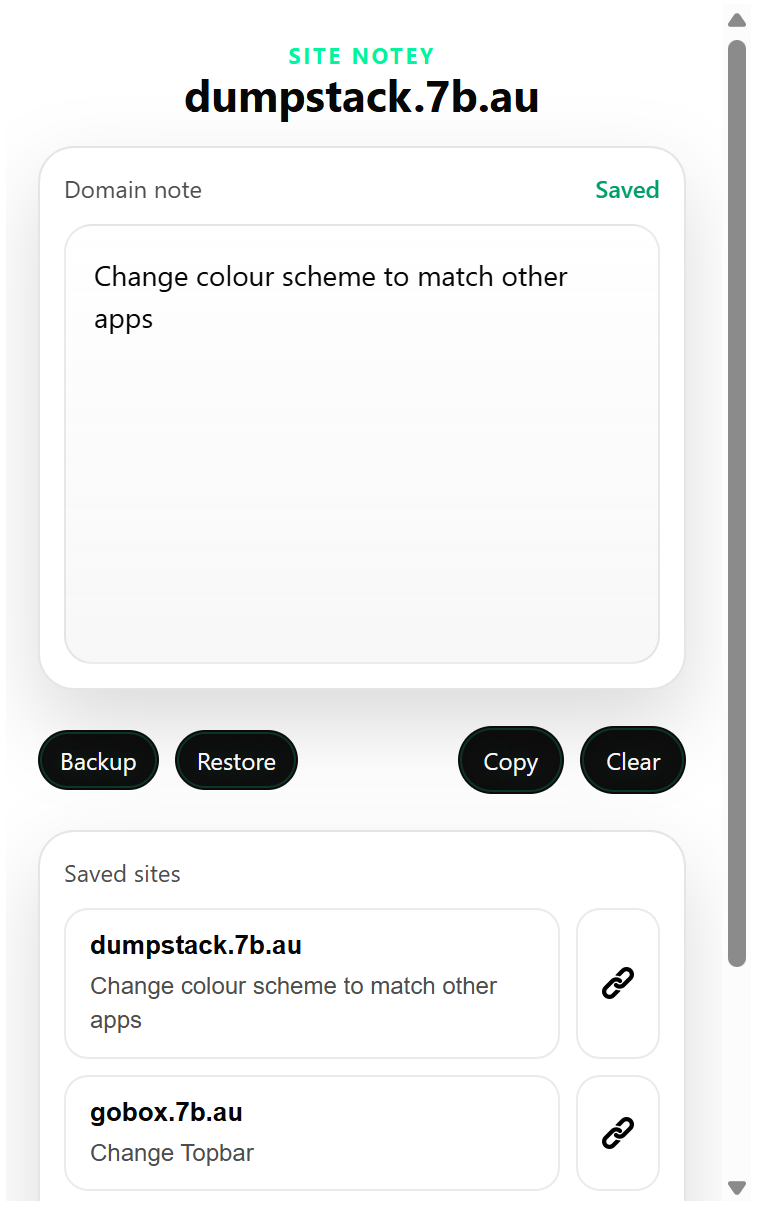
Site Notey is a lightweight Chrome extension that remembers one autosaved note for each website domain. Open the popup, jot down what matters, and come back later to find that note waiting on the same site.
How it works
Site Notey keeps things deliberately simple. It watches the active tab, finds the current domain, and loads the note saved for that domain from local Chrome storage.
Open the popup
When you are on a normal `http` or `https` page, the popup shows the current site name at the top.
Type anything useful
Write reminders, research notes, client details, to-do items, or anything else you want attached to that domain.
Come back later
Your note reloads automatically the next time you visit the same site and open the extension.
What�s included
The extension is built for fast everyday use, not ceremony.
Core features
- Autosaved domain notes stored locally in Chrome
- A plain, distraction-light editor
- Saved sites list for quick switching
- Copy current note with one click
Safety and portability
- Backup all notes to a JSON file
- Restore notes from a previous backup
- Open saved domains directly from the list
- Graceful handling for unsupported Chrome pages
Install in Chrome
Download the zip, unzip it, then load the folder as an unpacked extension in Chrome.
Download Site Notey
The package includes the current extension files ready for local installation.
Install steps
- Download `site-notey-extension.zip`
- Unzip it to a folder on your computer
- Open `chrome://extensions`
- Enable Developer mode
- Click Load unpacked and choose the unzipped folder
Good fit for
- research and reference notes by website
- client and prospect notes by domain
- shopping comparison notes
- keeping reminders close to the place they matter